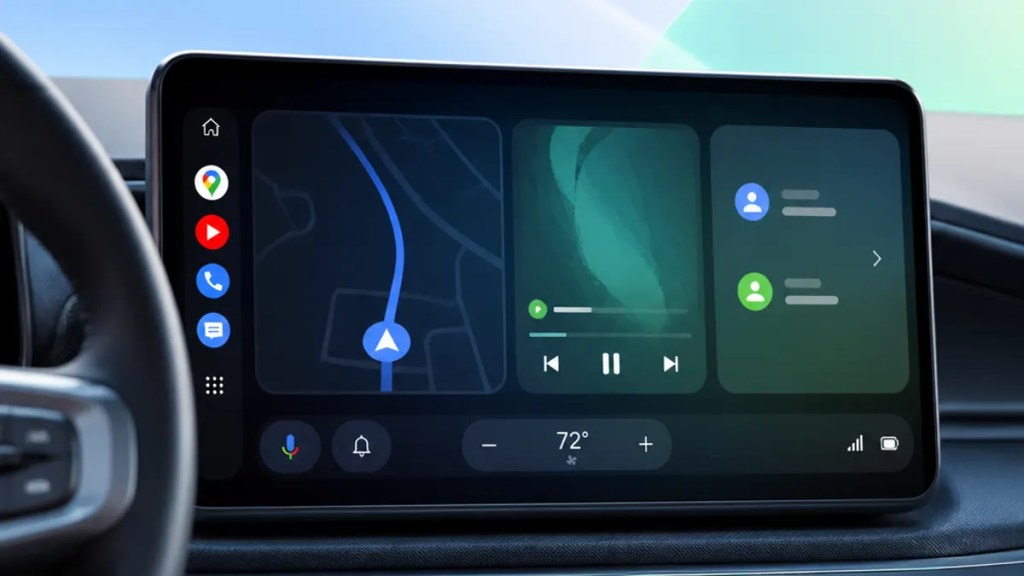
Android Auto’s Redesign Fills the Screen
If you use Android Auto mainly to get directions, control music, and avoid poking at your phone in traffic, this is the kind of update worth paying attention to. A new Android Auto redesign is reportedly on the way, and the big idea is simple: use more of your car’s display and make room for widget-style information panels that are easier to glance at while driving.
According to 9to5Google, Google Android Auto is being reworked to take up the full screen in more situations, while also adding support for widgets. That may sound like a cosmetic change, but in a car, layout matters. A cleaner, fuller interface can mean less wasted space and fewer taps when you’re trying to keep your eyes on the road.
Quick Summary
- Google is reportedly preparing an Android Auto update with a redesigned interface.
- The new look is expected to create a full-screen Android Auto experience, using more of the car display.
- It may also bring Android Auto widgets, which are small panels that show useful info at a glance.
- For drivers, the main benefit is straightforward: more information on screen without making the interface feel cramped.
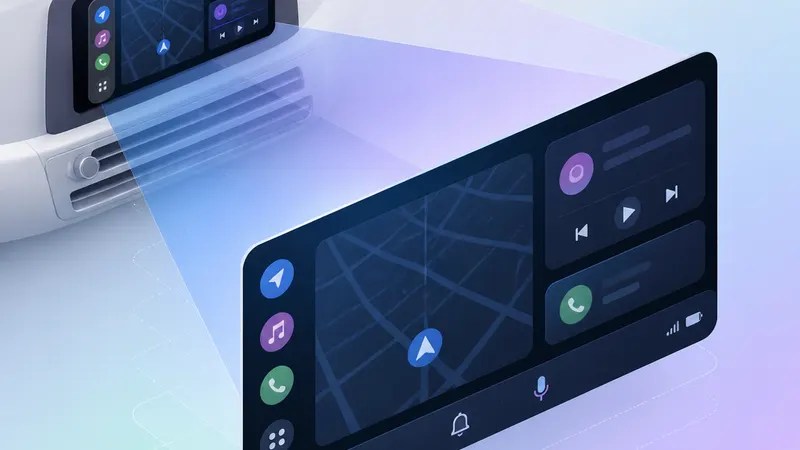
What’s changing in the Android Auto redesign
The headline feature here is the screen itself. As 9to5Google reports, Android Auto is getting a redesign that fills the display more completely instead of leaving parts of some screens underused.
That matters because modern cars increasingly ship with wide, tall, or unusually shaped infotainment displays. “Infotainment” is the dashboard screen system that handles navigation, media, and car-related software. When an interface doesn’t adapt well to that shape, you end up with awkward empty areas or elements that feel boxed in.
A car infotainment redesign like this suggests Google is trying to better match Android Auto to the hardware people already have in their vehicles, rather than forcing every screen into the same visual template.
Why widget support could be the more useful change
The other reported addition is Android Auto widgets. In plain terms, widgets are compact boxes that show live information without making you open a full app first.
On a phone, that might mean weather or calendar info on your home screen. In a car, the idea is more practical: glanceable bits of information that can sit alongside navigation or media controls.
9to5Google says widget support is part of this redesign, and that could end up being the real quality-of-life upgrade. A full-screen layout looks nicer, sure, but widgets may be what actually makes the system easier to use day to day. If you can see more of what you need at once, you spend less time jumping between screens.
That’s the part everyday drivers will likely care about most.
What to choose and why
If you’re wondering what this means for you, the answer depends on the screen in your car and how you use Android Auto now.
If your car has a large or oddly shaped display
The full-screen Android Auto approach is likely the better fit. Bigger screens can look strangely inefficient when software doesn’t stretch naturally across them. A redesign that uses the whole display should make the system feel more intentional and less like a phone interface enlarged to fit a dashboard.
If you want fewer taps while driving
Widgets may be the feature to watch. They’re designed to surface information quickly, which is exactly what in-car software should do well. If Google handles them carefully, they could make Android Auto feel calmer and more useful rather than busier.
If you already like the current layout
You may not need to “choose” much at all. This sounds like an interface evolution rather than a complete rethink. Based on 9to5Google’s reporting, the goal appears to be improving how Android Auto uses space, not changing the core purpose of the platform.
Why this Android Auto update matters beyond aesthetics
There’s an easy temptation to treat interface news as superficial. In cars, though, design choices affect how distracting a system feels.
A better-organized dashboard interface can reduce the number of steps between “I need directions” and “I’m back to watching traffic.” That’s why this Android Auto redesign matters even if you’re not someone who follows software updates closely.
And because Google Android Auto sits in so many different vehicles with so many different screen sizes, layout flexibility is not a small issue. It’s one of the main things that determines whether the software feels polished or awkward.
What isn’t confirmed yet
The source material here is limited, so there are still open questions.
For now, 9to5Google’s report points to a redesign that takes over more of the display and adds widgets, but details like exact rollout timing, which widget types will be supported, and how broadly the new interface will appear may still be unconfirmed. Until Google shares more, it’s safest to treat some of the finer points as expected rather than final.
The bottom line
This looks like the kind of Android Auto update that could make a real difference without changing how you use the platform at its core. More screen usage and widget support sound modest on paper, but in a car, small usability improvements tend to matter more than flashy additions.
If Google gets this right, the result may be an Android Auto interface that feels less constrained, more natural on modern dashboards, and easier to read at a glance.
FAQs
Is Android Auto getting a full-screen mode?
Yes, a report from 9to5Google says Android Auto is being redesigned to use the full display more effectively.
What are Android Auto widgets?
Widgets are small information panels that show useful details without opening a full app. According to 9to5Google, widget support is part of the reported redesign.
Do I need a new car to get the redesign?
That is not confirmed by the available source. The report describes a software redesign, but Google has not publicly detailed compatibility in the source provided.
Sources
Internal link suggestions
- A guide to the biggest Android Auto features and settings drivers actually use
- How Android Auto compares with Apple CarPlay on usability and screen design
- What to do when Android Auto stops connecting or glitches in your car
 techpost